Bella Canvas 3413 Unisex Mockup - 071: A Professional Tool for T-Shirt Design Presentation
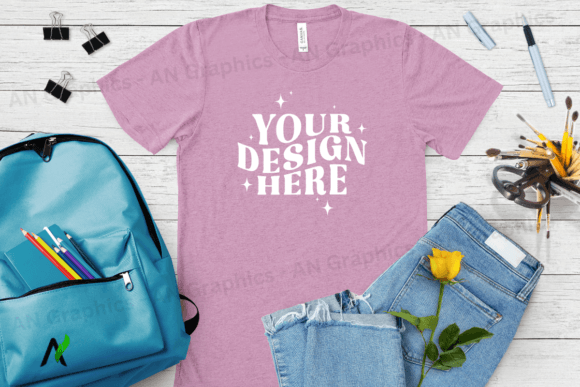
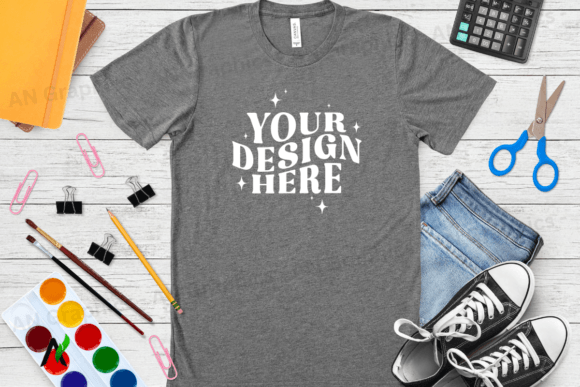
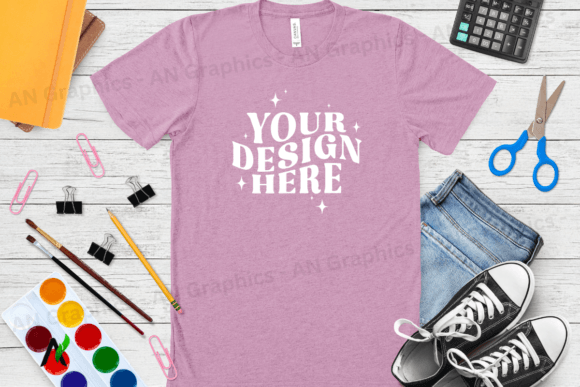
The Bella Canvas 3413 Unisex Mockup - 071 is a high-resolution JPEG mockup designed specifically for showcasing t-shirt designs. This digital download provides a clean, ready-to-use image that allows designers, entrepreneurs, and creators to present their work in a professional manner without the need for complex software or additional assets. The mockup is ideal for use in online stores, marketing materials, and design portfolios, offering a realistic preview of how a finished t-shirt would look.
Understanding the Bella Canvas 3413 Unisex Mockup - 071
This mockup is part of the Back To School Bella Canvas 3413 Unisex T-Shirt Mockup collection, which includes a variety of design options to suit different needs. The specific variant, Bella Canvas 3413 Unisex Mockup - 071, features a Lilac Triblend fabric texture, making it an excellent choice for designs that aim to highlight softness and comfort. The mockup is available in a high-resolution format (3750 x 3000 px) at 300 dpi, ensuring crisp and clear visuals even when printed or displayed on large screens.
One of the key advantages of this mockup is its compatibility with various photo editing tools. Unlike some mockups that require PSD smart objects, this one is a flat JPEG image, making it easy to edit using software like Photoshop, Canva, or any other image editing platform. Users can simply layer their design or text on top of the mockup, allowing for quick and efficient customization.
How to Use Bella Canvas 3413 Unisex Mockup - 071 in Your Workflow
Incorporating the Bella Canvas 3413 Unisex Mockup - 071 into your workflow can streamline the process of presenting t-shirt designs. Whether you are a small business owner looking to launch a new product line or a designer creating custom apparel for clients, this mockup serves as a versatile tool throughout various stages of the project.
Before Starting a Project: Use the mockup during the planning phase to visualize how your design will look on a real t-shirt. This helps in making informed decisions about color schemes, typography, and overall aesthetics before committing to production.
During the Design Process: As you develop your design, the mockup acts as a reference point. You can place your artwork on the mockup to see how it interacts with the fabric texture and ensure that the final design looks as intended.
After Finalizing the Design: Once your design is complete, the mockup becomes an essential part of your marketing strategy. It can be used in product listings, social media posts, and email campaigns to showcase your t-shirts in a professional and appealing way.
Integration with Other Tools and Platforms
The Bella Canvas 3413 Unisex Mockup - 071 is compatible with a wide range of design and editing platforms, making it a flexible asset for different workflows. Here are a few examples of how it can integrate with other tools:
- Photoshop: Import the mockup into Photoshop and use layers to add your design elements. The high-resolution format ensures that your edits maintain quality, even when zoomed in.
- Canva: Upload the mockup to Canva and take advantage of its drag-and-drop interface to quickly place your design on the t-shirt. This is especially useful for users who may not be familiar with advanced photo editing software.
- E-commerce Platforms: Use the mockup as a product image on your online store. Its professional appearance helps build trust with customers and increases the likelihood of conversions.
By integrating the mockup with these tools, you can create a cohesive workflow that enhances both efficiency and quality. Additionally, since the mockup is logo-free and watermark-free, it offers maximum flexibility for branding and customization.
Practical Implementation Tips and Workflow Examples
To get the most out of the Bella Canvas 3413 Unisex Mockup - 071, consider the following tips and workflow examples:
Tip 1: Organize Your Assets
Keep all your mockups, designs, and templates in a well-organized folder structure. This makes it easier to locate and use them when needed, especially if you are working on multiple projects simultaneously.
Tip 2: Use Consistent File Naming
Adopt a consistent naming convention for your files. For example, "BC3413_Mockup_071_Lilac_Triblend" clearly indicates the type of file, mockup version, and fabric texture.
Workflow Example 1: Creating a Product Listing
Start by designing your t-shirt graphic using your preferred software. Once the design is finalized, open the Bella Canvas 3413 Unisex Mockup - 071 in Photoshop or Canva. Layer your design onto the mockup and adjust the placement as needed. Save the final image and upload it to your e-commerce platform for display.
Workflow Example 2: Social Media Marketing
Design a promotional graphic for your upcoming t-shirt collection. Place the graphic on the mockup to show how it would look on a real t-shirt. Add text overlays, hashtags, and relevant information before posting it on social media platforms like Instagram or Facebook.
Factors to Consider for Long-Term Use and Quality Control
When using the Bella Canvas 3413 Unisex Mockup - 071 over an extended period, there are several factors to consider to ensure consistency and quality:
Preparation: Before starting any project, make sure you have all the necessary tools and assets ready. This includes the mockup itself, your design files, and any editing software you plan to use.
Compatibility: Verify that the mockup is compatible with your chosen editing platform. While the mockup is a flat JPEG image, some platforms may require specific file formats or resolutions for optimal performance.
Usability: Choose a mockup that aligns with your design goals. If you are targeting a younger audience, the Lilac Triblend texture may be more appropriate than a different fabric option.
Organization: Maintain a clear and organized workflow by separating your mockups, designs, and templates into different folders. This helps prevent confusion and ensures that you can easily access the right assets when needed.
Efficiency: Streamline your workflow by using batch processing techniques or automation tools where possible. This can save time and reduce the risk of errors when working on multiple projects.
Consistency: Ensure that all your mockups and designs follow a consistent style and format. This helps maintain a cohesive brand identity across all your products and marketing materials.
Quality Control: Always review your final output before publishing or sharing it. Check for any errors, inconsistencies, or formatting issues that could affect the overall quality of your presentation.
Long-Term Use: Invest in high-quality mockups that can be reused for future projects. The Bella Canvas 3413 Unisex Mockup - 071 is a valuable asset that can be used for multiple designs and campaigns over time.
By considering these factors, you can ensure that your use of the Bella Canvas 3413 Unisex Mockup - 071 remains efficient, effective, and aligned with your long-term goals.